

AI tool Details
Explore More
Alternatives
About ProcessSpy
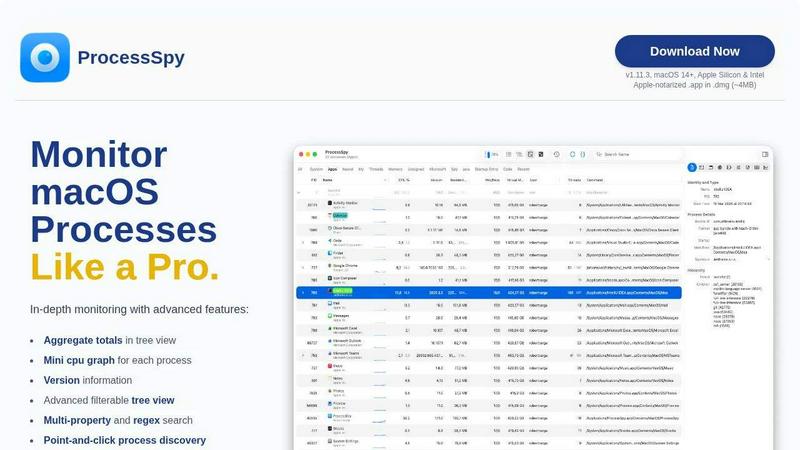
ProcessSpy is a powerful process monitoring tool designed specifically for macOS users who demand deeper insights into their system's operations. Unlike the standard Activity Monitor, ProcessSpy reveals the hidden intricacies of running applications, allowing you to visualize process trees, inspect open files, and view environment variables in a user-friendly interface. Whether you are a developer juggling multiple applications, a system administrator troubleshooting issues, or a curious user wanting to understand your Mac better, ProcessSpy provides a comprehensive solution to monitor and manage your processes effectively. Its main value proposition lies in its ability to deliver detailed, real-time information about running processes, empowering users to take control of their computing experience like never before.
Features
Advanced Tree View
The Advanced Tree View feature in ProcessSpy allows users to see a detailed hierarchy of processes, complete with real-time filtering and search capabilities. This view aggregates totals for CPU, Memory, and Threads, enabling you to quickly assess the resource consumption of your applications.
Javascript Filters
With Javascript Filters, you can create complex, multi-condition filters to refine your process searches. This feature allows you to tailor your monitoring experience, ensuring that you can pinpoint exactly what you need without sifting through irrelevant data.
Process History Recording
ProcessSpy includes a Process History Recording feature that tracks historical values for CPU, Memory, and Threads over time. This valuable data can be exported to CSV files for further analysis, helping you identify trends and optimize resource usage.
Remember Finished Processes
The Remember Finished Processes feature allows ProcessSpy to keep track of previously terminated processes, including their command line arguments and environmental variables. This capability ensures you can revisit past activities and understand how they may have impacted your system.
Use Cases
Efficient Development Environment
Developers can leverage ProcessSpy to manage multiple Java applications running on different JDK versions seamlessly. The tool's ability to show full command-line info and paths simplifies the process of identifying and troubleshooting issues in development environments.
System Performance Monitoring
System administrators can utilize ProcessSpy to monitor system performance and resource allocation effectively. By visualizing aggregate values in hierarchy mode, they can quickly identify resource hogs and optimize system efficiency.
Troubleshooting Stubborn Applications
When dealing with unresponsive applications, ProcessSpy empowers users to act swiftly. With its ability to kill stubborn apps instantly and inspect open files, users can troubleshoot problems without extensive downtime or frustration.
Learning and Exploration
Curious users wanting to learn more about how their macOS operates will find ProcessSpy invaluable. By exploring running processes in detail, users can gain insights into system behavior and enhance their understanding of macOS functionality.
Frequently Asked Questions
Is ProcessSpy safe to install on my Mac?
Yes. ProcessSpy is Apple-notarized and distributed as a signed .app inside a .dmg, ensuring it is verified and safe to use on both Intel and Apple Silicon Macs.
Does ProcessSpy support older versions of macOS?
ProcessSpy is designed for macOS 14 and newer, ensuring that users have access to the latest features and optimizations.
What is the license model?
The license is valid for one user on unlimited devices. It includes lifetime updates and access to new features, making it a worthwhile investment for ongoing system monitoring.
How does ProcessSpy compare to Activity Monitor?
ProcessSpy offers a range of advanced features not available in Activity Monitor, including full command-line visibility, process tagging, and extensive filtering options, making it a superior choice for users needing detailed process management.
Similar to ProcessSpy

SightRadar
Face recognition API, a drop-in replacement for AWS Rekognition. Index, search, compare and detect faces, billed per photo with no subscription.

MD to Text
Convert Markdown to clean, readable plain text instantly. Remove formatting, copy the result, and keep every conversion private in your browser.

Enlisted
Search 20,000+ open-source and SaaS tools by the job you need done or the app you want to replace.

JevModel
Run Choice, Score and Noul decisions on text or JSON. Build visual flows, process batches and integrate results through an API.

layahost
Moderation, routing, intent and scoring for any text over one Jev-compatible API, hosted in the EU.

laya.tools
Free directory of 950+ projects built on Laya, the open-source model that turns text into typed decisions in milliseconds.

Sprite Sheet Maker
A free browser-based toolkit for creating, cutting, converting, and previewing sprite sheet animations.