

Perkoon
Experience limitless file transfers with Perkoon, where you send files freely and securely without any sign-up hassle.
AI tool Details
Explore More
Alternatives
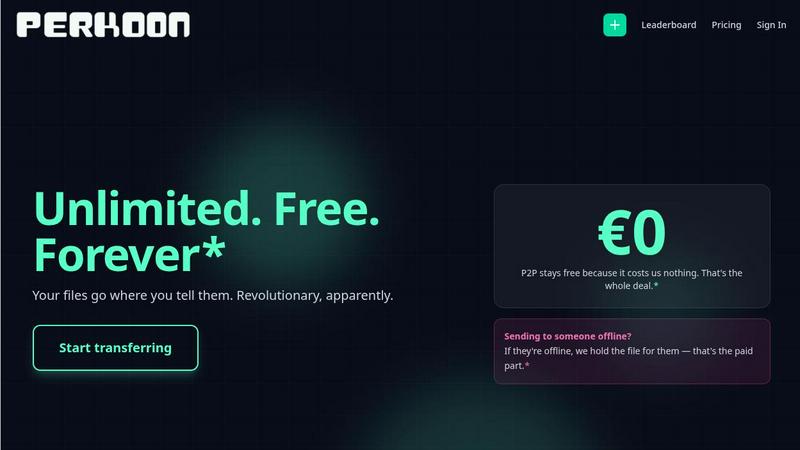
About Perkoon
Perkoon is a revolutionary file transfer service designed to simplify the way we share files. It is built for individuals and teams who are tired of the cumbersome processes, hidden fees, and data exploitation often associated with traditional file-sharing platforms. At its core, Perkoon streamlines the transfer of files from one location to another, enabling users to send large files without the hassle of accounts, size restrictions, or privacy concerns. Utilizing cutting-edge peer-to-peer (P2P) technology, Perkoon allows users to transfer files directly between browsers when both parties are online, ensuring a seamless and private experience. For instances when recipients are offline, Perkoon provides a secure cloud storage solution, ensuring that your files remain accessible yet protected. The service stands out with its integration of AI tools, enabling automation and direct interaction with AI agents, making file transfers smarter and more efficient. Perkoon is not just a service; it's a commitment to user empowerment and privacy in the digital age.
Features
Peer-to-Peer File Transfer
Perkoon utilizes advanced peer-to-peer technology to enable direct file transfers between users’ browsers. This means no size limits or accounts are required, allowing for an effortless file-sharing experience. The data is transferred directly and does not pass through a central server, ensuring both privacy and security.
Encrypted Cloud Storage
For users who need to send files to recipients who are offline, Perkoon offers encrypted cloud storage as part of its paid features. This ensures that files are securely stored and only accessible by the intended recipient, maintaining a high standard of data protection.
AI Integration
Perkoon is designed for the modern age, with built-in tools that facilitate automation and allow AI agents to interact directly with the service. This eliminates the need for screen-scraping and enhances the efficiency of file transfers, making it easier for users to manage their files using AI.
Simple Command-Line Interface (CLI)
For tech-savvy users and developers, Perkoon offers a straightforward command-line interface. This allows for easy access and interaction with the file transfer service, providing a powerful tool for automating file management processes and integrating with other applications.
Use Cases
Personal File Sharing
Individuals can effortlessly share large files like photos, videos, or documents with friends and family using Perkoon’s P2P technology. This enables quick transfers without the need for accounts or lengthy upload times, all while maintaining privacy.
Team Collaborations
For teams working on projects, Perkoon simplifies the sharing of large files such as presentations, reports, and design assets. The ability to send files directly between team members without restrictions fosters a collaborative environment.
Offline File Transfers
When a recipient is offline, Perkoon’s encrypted cloud storage ensures that files are safely held until the recipient is available to download them. This feature guarantees that important documents or media are never lost and are easily retrievable.
AI-Driven Automation
Developers and businesses can leverage Perkoon’s AI integration to automate file transfers and streamline workflows. By using the service's CLI and AI tools, users can enhance operational efficiency and reduce manual tasks associated with file management.
Frequently Asked Questions
Is Perkoon really free?
Yes, Perkoon offers a free P2P file transfer service that costs nothing to use because it relies on peer-to-peer technology. The service remains free for users as it does not involve server costs in this mode.
How does Perkoon ensure my files are secure?
Perkoon takes security seriously. P2P transfers do not touch Perkoon’s servers, ensuring that your data remains private. For cloud transfers, files are encrypted on the servers, providing an additional layer of protection.
Can I use Perkoon on any browser?
Perkoon works seamlessly on Chrome, Edge, and Brave without any limits. However, it does have some restrictions on Firefox and Safari, which may affect functionality.
How can I earn more storage with Perkoon?
You can earn more cloud storage by referring friends to join Perkoon. When they sign up using your unique referral link and transfer files, both you and your friend receive bonus storage, fostering a rewarding community.
Similar to Perkoon

Safe Outreach
AI-powered platform that evaluates the safety of LinkedIn automation tools and helps reduce the risk of account restrictions.

How Long How Many Tool
Timers and hourly checks to figure how out long until a certain time or how many days away.


ButterShare
Realtime peer-to-peer file transfer in the browser. Send files directly between devices, no account and no upload to a server.

Emailyy
Free email tools for signatures, subject lines, HTML previews, word counts, and email headers. Browser-based, simple to use, and no signup required.

Uniclip
Clip pages, take full-page screenshots and batch-capture list data to Notion, Feishu, Obsidian, Markdown, CSV or JSON.

TroveKey
Search tabs, Chrome bookmarks and history, run browser commands, and save webpages and social posts locally—no account.

LightScreen
Free light screen tool online. Turn any display into a flashlight, ambient light, or solid-color screen. No download or sign-up.