

KPI Studio
Stop spending hours in After Effects and turn your data into polished video charts in under 60 seconds.
AI tool Details
Explore More
Alternatives
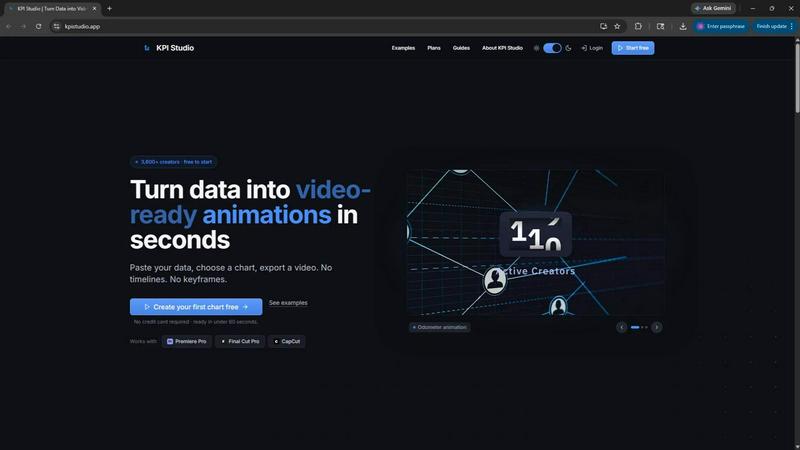
About KPI Studio
KPI Studio is the definitive tool for data-driven video creators who need professional, animated charts in every video but simply do not have the time or budget for complex motion design. It is built to solve a fundamental problem: the broken workflow that forces creators to choose between amateur-looking screenshots, rigid Canva templates, hours of labor in After Effects, or the high cost and slow turnaround of freelance motion designers. KPI Studio removes that entire process. This product empowers you to paste your raw data, choose a chart style, and export a fully animated, video-ready visual in under 60 seconds. There are no timelines to manage, no keyframes to set, and no lengthy setup. The core value proposition is speed and precision. Exports include transparent backgrounds, meaning your charts drop directly into Premiere Pro, Final Cut Pro, or CapCut with zero additional editing. For advanced workflows, JSON export allows for deeper integration into custom pipelines. KPI Studio is built for creators on a publish schedule who need the chart today, not tomorrow. It transforms a painful, time-consuming task into a seamless, empowering experience, allowing you to focus on storytelling and audience growth instead of wrestling with animation software.
Features
Lightning-Fast Data-to-Video Conversion
The core feature of KPI Studio is its ability to transform raw data into a fully animated video in under 60 seconds. You simply paste your numbers, select a chart type, and the tool handles the rest. There are no complex timelines, no keyframes to place, and no rendering queues. This speed is a game-changer for creators who are on a tight publishing schedule. When a number changes, you do not need to redo a motion design project. You just re-paste the data and re-export. This feature eliminates the bottleneck of data visualization, turning a process that once took hours into a task that takes less than a minute.
Video-Ready Exports with Transparency
KPI Studio provides a range of export formats specifically designed for video editing workflows. The most powerful of these is the MOV export with an alpha channel, which allows your animated chart to be placed directly over any video background without any additional compositing or keying. You also have the option to export as MP4, GIF, and PNG sequences. This feature ensures that the chart is ready the moment you click export. It integrates seamlessly with industry-standard editing software like Premiere Pro, Final Cut Pro, and CapCut, saving you the time and frustration of manual background removal.
Diverse Chart and Aspect Ratio Library
The tool offers a comprehensive library of chart types and aspect ratios to fit any content format. You can create count-up animations for milestone numbers, growing bar charts for competitive comparisons, and self-drawing line charts for trend analysis. Beyond the chart types, KPI Studio supports all major aspect ratios, including 16:9 for widescreen, 9:16 for Stories, 1:1 for social media squares, and 4:3 for standard presentations. This flexibility ensures that your data visualization is perfectly optimized for YouTube, Instagram, TikTok, or your own video editor, without any manual resizing.
Advanced JSON Export for Custom Pipelines
For power users and creators with advanced workflows, KPI Studio offers a JSON export option. This feature allows you to export the chart data and animation parameters as a structured file. This JSON can then be imported into other software or custom pipelines for deeper editing and integration. This is a critical feature for developers, data journalists, and teams who need to automate their content creation process or apply custom branding and effects that go beyond the tool's standard capabilities. It bridges the gap between rapid creation and complete creative control.
Use Cases
YouTube Channel Growth Reports
A YouTuber can use KPI Studio to create compelling, animated growth reports for their monthly or yearly review videos. Instead of showing a static screenshot of their analytics dashboard, they can paste their subscriber count, total views, and revenue data into the tool. They can then export a count-up animation for their subscriber milestone and a drawing line chart for their viewership trend. These animated visuals are then dropped directly into their Premiere Pro timeline, making their review video far more engaging and professional than a simple static graphic.
Social Media Shorts and Reels
Creators making short-form content for Instagram Reels or TikTok can use KPI Studio to produce visually striking data reveals. For example, a financial creator can animate a growing bar chart comparing different investment returns in a 9:16 format. A business creator can use a count-up counter to reveal their monthly revenue or the number of clients served. The transparent background export is perfect here, allowing the animated chart to sit on top of a video of the creator speaking, adding a layer of professional motion graphics that holds viewer attention.
Corporate and Client Presentations
Professionals who need to present key performance indicators (KPIs) to clients or stakeholders can use KPI Studio to elevate their slide decks. Instead of using a static chart in PowerPoint or Google Slides, they can embed a short, looping MP4 animation of their key metrics. This makes quarterly business reviews, sales pitches, and project updates far more dynamic and memorable. The tool’s speed is a major advantage here, as last-minute data changes can be incorporated into the presentation without requiring a redesign from a graphic designer.
Educational and eLearning Content
Educators and eLearning content creators can use KPI Studio to make data more accessible and engaging for their students. Explaining a concept like population growth, sales trends, or scientific data becomes much easier with an animated line chart that draws itself on screen. A history teacher could animate a timeline of events, while a business professor could show a growing bar chart of market share. The animated visuals help to break down complex information and maintain student engagement throughout the lesson.
Pricing
KPI Studio offers a simple and transparent pricing structure designed to fit different creator needs. You can start for free with no credit card required. The Free plan includes unlimited PNG exports and three free animated exports, allowing you to try the tool on your next video. For occasional exports, the Creator Pack is a one-time purchase for $11.99, which gives you 10 video exports (GIF, MP4, WebM, and MOV) with no watermark at 1080p resolution. For creators who publish every week, the Pro plan is the most popular option at $19.99 per month. It includes unlimited video exports in all formats, no watermark, and 4K export resolution, with the ability to cancel anytime.
Frequently Asked Questions
What file formats does KPI Studio support for export?
KPI Studio supports a wide range of video and image formats to fit any workflow. You can export your animated charts as MP4, MOV (with and without an alpha channel for transparency), GIF (with and without transparency), and PNG sequences. For advanced users, a JSON export option is also available, which allows you to integrate the chart data and animation into custom pipelines or other software.
Do I need any design or animation experience to use KPI Studio?
No, you do not need any design or animation experience. KPI Studio is built specifically to eliminate the need for motion design skills. The entire process is designed to be simple and intuitive: paste your data, choose a chart, and export. There are no timelines, keyframes, or complex settings to learn. It is built for video creators who know what they want to show but do not want to spend hours learning how to animate it.
Can I change the data after I have exported a chart?
Yes, changing your data is incredibly simple. Because KPI Studio is not a motion design project file, you do not need to redo any work. You simply go back to your project, change the numbers in the data input field, and click export again. The tool will regenerate the animation with the new data in under 60 seconds. This makes it perfect for creators who need to update metrics regularly, such as for weekly reports or daily social media posts.
How does KPI Studio compare to using After Effects for charts?
KPI Studio is fundamentally different from After Effects. After Effects is a professional motion design tool that requires a steep learning curve and hours of work to build and animate a single chart. Every time a number changes, you must manually redo keyframes. KPI Studio is a specialized tool that does one thing exceptionally well: it turns data into animated videos in under a minute. It is the fast path, while After Effects is the complicated path. For a simple metric reveal, KPI Studio is vastly faster and easier to use.
Similar to KPI Studio
AI STL Generator
The fastest AI STL generator to turn prompts and images into 3D printable STL files.

AIEnhancer
Enhance photos, create images, and generate videos with an all-in-one AI enhancer for flexible creative workflows.
AudioVideo
Turn podcasts, narration, voice recordings, or music into visual content with an audio-aware AI video generator.

Motiofy
Motiofy is an AI creative workspace that helps creators and teams turn ideas into polished visual stories.

VidRush AI
AI-powered long video generator. Create multi-modal AI videos by combining images, video, audio, and text.


Free Gemini Omni
Create, remix, and edit cinematic AI videos online with text, image, audio, and video prompts.

Seedance 2.5 Free
Create polished AI videos from text prompts or images with Seedance 2.5 Free.