

HomeEquipmentAge
Stop guessing your furnace or AC age and decode your equipment's serial number instantly for free to take control of your next home maintenance.
AI tool Details
Explore More
Alternatives
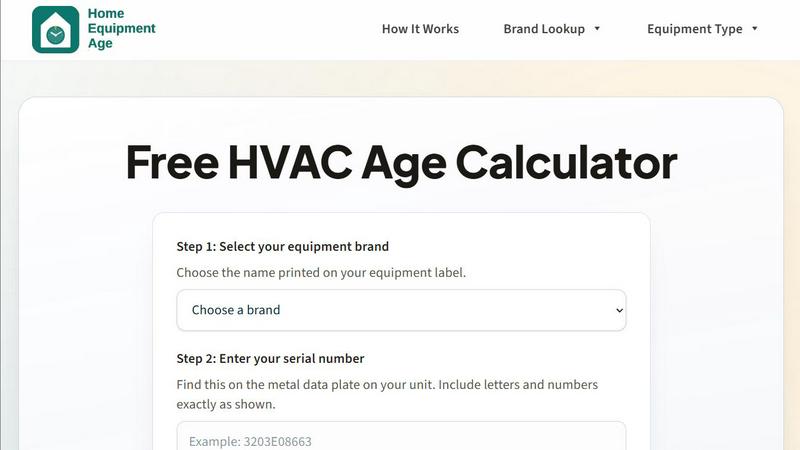
About HomeEquipmentAge
HomeEquipmentAge is a free, no-signup serial number decoder and HVAC age calculator designed specifically for homeowners. It transforms the confusing jumble of letters and numbers on your equipment data plate into actionable, easy-to-understand information. Instead of feeling lost or pressured when your furnace, air conditioner, or heat pump acts up, you can finally get a clear picture of your system's history. This tool empowers you to decode the manufacture date, estimate the age, and understand the remaining useful life of your equipment. It is built for anyone who wants to be an informed decision-maker, not a passive bystander, when it comes to their home's comfort and budget. By simply selecting your brand, entering the serial number, and clicking decode, you bypass the need for scattered forum posts, outdated charts, or expensive service calls just to get a date. HomeEquipmentAge gives you the context you need to confidently plan maintenance, budget for potential repairs, or know when it is time to start gathering replacement quotes. It supports a wide range of equipment types including furnaces, central air conditioners, heat pumps, water heaters, boilers, packaged rooftop units, and ductless mini-splits. The tool covers over 20 major brands like Carrier, Trane, Lennox, and Goodman. It is a decision-support tool that turns a confusing serial code into a clear, empowering next step, putting you in control of your home's biggest systems.
Features
Instant Serial Number Decoding
This core feature eliminates the guesswork from reading your equipment's birth certificate. You simply select your brand from a comprehensive list of over 20 major manufacturers, then type in the serial number exactly as it appears on the metal data plate. The tool instantly cross-references your input against known, published pattern families used by service technicians. Within seconds, you receive a clear estimate of the manufacture date and the approximate age of your unit. This feature is designed to be fast, intuitive, and 100% free, requiring no account creation or personal information. It turns a cryptic code into a powerful piece of knowledge you can use immediately.
Clear Next-Step Guidance
Knowing your equipment's age is only the first step; understanding what to do with that information is where the real value lies. HomeEquipmentAge provides clear, tiered guidance based on the estimated age of your unit. For equipment that is 0 to 9 years old, the recommendation is to maintain and monitor with annual service. For systems aged 10 to 14 years, the tool advises you to start planning a budget for a higher frequency of potential repairs. For units that are 15 years or older, the guidance is to proactively compare replacement quotes and coverage options. This feature transforms a simple date into a practical action plan, helping you make smarter money decisions before a sudden breakdown forces your hand.
Comprehensive Brand and Equipment Support
This tool is built to be a one-stop resource for a wide variety of home systems. It covers over 20 of the most common HVAC brands, including Amana, American Standard, Carrier, Daikin, Goodman, Lennox, Rheem, Trane, and York. Beyond just brands, it supports a full spectrum of equipment types, from furnaces and central air conditioners to heat pumps, water heaters, boilers, packaged rooftop units, and ductless mini-splits. This broad coverage ensures that whether you are checking a basement boiler or a rooftop unit, you have the right tool to decode its age. The site also includes dedicated brand pages and equipment type guides for deeper dives into specific serial number structures.
Educational Resource Hub
HomeEquipmentAge is more than just a calculator; it is an educational platform that empowers you with knowledge. The site features dedicated pages that explain how HVAC serial numbers are structured, common places to find the data plate on your unit, and why age matters for maintenance, budgeting, and planning a replacement. It helps you understand the logic behind the codes, turning you from a confused homeowner into a savvy consumer. You can easily navigate between popular brand lookups and equipment type guides to learn more about your specific system. This feature ensures you are not just getting an answer, but understanding the "why" behind it, building your confidence for future conversations with technicians and contractors.
Use Cases
Pre-Service Call Preparation
Before you call a technician to diagnose a problem with your furnace or air conditioner, you can use HomeEquipmentAge to get a baseline understanding of your system. Knowing the age of your equipment allows you to have a more informed conversation with the service professional. You can ask more pointed questions about whether a costly repair is worth it for a system that is already 15 years old. This preparation helps you avoid being caught off-guard by a recommendation you are not ready for. It transforms you from a passive recipient of information into an active participant in the decision-making process, saving you time, stress, and potentially money.
Budgeting for Future Replacement
One of the most stressful financial surprises for a homeowner is a major system failure. HomeEquipmentAge helps you plan ahead by giving you a clear picture of where your equipment sits in its lifecycle. If your heat pump is 12 years old, the tool's guidance will prompt you to start setting aside a budget for potential repairs or a full replacement. This proactive approach allows you to spread out the financial impact over time rather than facing a large, unexpected expense. It empowers you to be in control of your home's financial planning, turning a potential crisis into a manageable budget item.
Validating Information from Sellers or Landlords
When buying a new home or renting a property, you can use HomeEquipmentAge to verify the age of the installed HVAC equipment. A seller or landlord might claim the system is "only a few years old," but the serial number tells the true story. By quickly decoding the serial number from the data plate, you can get an independent estimate of the manufacture date. This gives you powerful leverage during price negotiations or when planning for future maintenance responsibilities. It turns you into a more informed buyer or tenant, ensuring you are not inheriting a hidden, expensive problem.
Comparing Replacement Quotes with Confidence
When it is time to consider a new system, contractors will often ask about your old unit's age. By using HomeEquipmentAge first, you already have this critical piece of information in hand. This allows you to have a more balanced conversation when comparing quotes for repair versus replacement. You can confidently tell a contractor, "My unit is 16 years old, so I am leaning toward replacement. What are my options?" This knowledge puts you on a more equal footing with the professional, ensuring the advice you receive is tailored to your specific situation and not based on assumptions. It empowers you to make the final call with clarity and confidence.
Frequently Asked Questions
Is HomeEquipmentAge really free to use?
Yes, HomeEquipmentAge is completely free to use. There are no hidden fees, subscription plans, or requirements to sign up or create an account. You can simply visit the site, select your brand, enter your serial number, and get an instant age estimate. The tool is designed to be a free resource for all homeowners.
How accurate is the age estimate?
The results are estimates based on published manufacturer serial number pattern families and common field references used by service technicians. Because brands can change their coding conventions over time, the tool interprets your serial against known patterns. If a serial is ambiguous, the tool favors safer estimates. For high-stakes decisions like a major repair or full replacement, it is always best to confirm the manufacture date with your service invoices, the sticker on the unit, or a professional inspection.
What types of equipment does the calculator support?
The calculator supports a wide range of common home comfort and utility equipment. This includes furnaces, central air conditioners, heat pumps, water heaters, boilers, packaged rooftop units, and ductless mini-split systems. If you have a major brand like Carrier, Trane, Lennox, or Goodman, the tool is very likely to support your serial number format.
Where do I find the serial number on my equipment?
The serial number is typically found on a metal data plate affixed to the side or back of your outdoor unit (for ACs and heat pumps) or on the inside panel of your furnace or air handler. Look for a sticker or plate that lists the model number and serial number. Enter the serial number exactly as it appears, including all letters and numbers, without any spaces or special characters.
Similar to HomeEquipmentAge


Pestless
Stop battling pests alone and let Pestless match you with a licensed local pro for a free, no-obligation quote today.
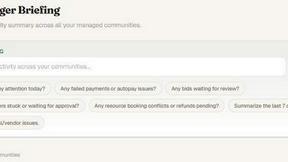
PropMIS
PropMIS transforms HOA management by automating dues, documents, and communications so you can focus on what matters.
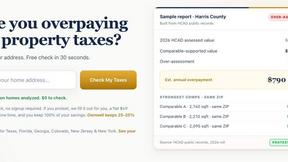
AppealMyTax
AppealMyTax checks your property against county records for free, then prepares your protest for a flat $49 fee so you keep all savings.

AIRE Software
Transform your project validation with AIRE, delivering market and finance insights in just five days.

Hey! Sell My House Fast
Sell your house fast for cash in any condition and reclaim your freedom in as little as 14 days.

EICR Bristol
EICR Bristol provides trusted, affordable EICR and PAT testing services, ensuring safety and compliance for landlords and businesses alike.

Homesage.AI
Discover untapped real estate potential with Homesage.AI's AI-driven insights on over 150 million properties for smart investment decisions.