

CustomTattoo AI
Turn your tattoo idea into a try-before-you-ink preview that gives you the confidence to book your next piece.
AI tool Details
Explore More
Alternatives
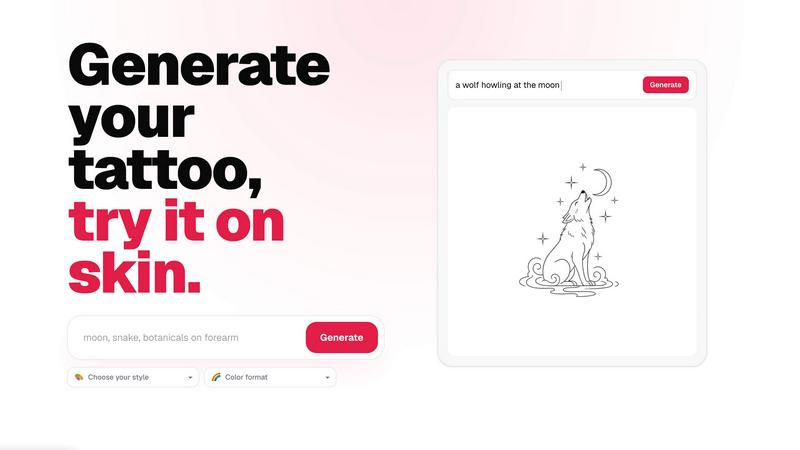
About CustomTattoo AI
CustomTattoo AI is a transformative, AI-powered platform designed for anyone planning their next tattoo, from first-time clients to seasoned enthusiasts. It empowers you to move from a vague idea to a clear, artist-ready design you can visualize on your own skin before committing to a permanent decision. The product bridges the gap between imagination and reality, allowing you to describe your tattoo concept in natural language, generate unique designs in endless artistic styles, and preview them directly on a photo of your body. With CustomTattoo AI, you are no longer relying on guesswork or generic images from the internet. You can explore different directions, compare color formats like black and grey or full color, and refine the placement until it feels right. The platform saves your favorite designs to a personal library, giving you a curated set of options to discuss with your tattoo artist. This is not just a generator; it is a confidence-building tool that ensures you walk into the studio with a strong, clear visual direction. For artists, it provides a precise reference that saves time and reduces back-and-forth. CustomTattoo AI is your partner in the creative journey, turning anxiety into excitement and uncertainty into a powerful, personalized plan. It is the smart, modern way to approach body art, giving you the clarity and control you deserve before making a permanent mark.
Features
AI-Powered Design Generation
Transform your written ideas into stunning, original tattoo concepts instantly. Simply describe the subject, placement, and mood of your desired tattoo, and the advanced AI engine generates multiple unique designs tailored to your brief. This feature eliminates the need to search through endless online galleries or rely on an artist's initial interpretation. You get a personalized starting point that reflects your exact vision, from a gothic dragon with wide wings to a delicate crescent moon with botanicals. The AI understands context and style, producing artwork that feels intentional and ready for refinement.
On-Skin Try-On Preview
See your chosen tattoo design realistically placed on your own skin before you ever sit in the chair. This core feature uses augmented reality and body mapping technology to overlay the generated design onto a photo of the body part you have selected. You can adjust the size, angle, and position to see how the tattoo flows with your natural contours. This preview eliminates the fear of the unknown, allowing you to test placement on your forearm, shoulder, or back. It gives you the power to make informed decisions about scale and location, ensuring the final result enhances your body exactly as you envision.
Style and Color Exploration
Unlock a world of artistic possibilities by exploring an extensive library of tattoo styles and color formats. From traditional and neo-traditional to watercolor, geometric, blackwork, and realism, you can instantly apply different aesthetics to your core design. Pair this with color choices like vibrant full color, subtle black and grey, or monochrome linework. This feature allows you to compare a gothic blackwork dragon against a neo-traditional version side-by-side, helping you discover a visual direction you might not have considered. It transforms the creative process into an exciting, low-risk experiment.
Personal Design Library and Artist-Ready Output
Save all your generated concepts, try-on previews, and style variations into a secure, personal library accessible from any device. This curated collection becomes your visual brief, allowing you to track your creative journey and compare options over time. Most importantly, every design can be exported as a high-quality, artist-ready reference image. This file includes the final design, the chosen placement preview, and notes on style. You can take this clear direction directly to your tattoo artist, ensuring they understand your vision perfectly and reducing the time spent on consultation and revision.
Use Cases
First-Time Tattoo Client Building Confidence
For someone getting their first tattoo, the biggest hurdle is often fear of regret. CustomTattoo AI provides a safe, zero-pressure environment to experiment. You can start with a simple idea like a small floral design, generate it in multiple styles, and preview it on your wrist or ankle. This process demystifies the result and builds immense confidence. By the time you book a session, you are not guessing; you are certain. You have already seen the design on your skin and know exactly how it makes you feel, turning a nerve-wracking decision into an empowering one.
Tattoo Enthusiast Planning a Sleeve or Large Piece
Planning a large, cohesive piece like a full sleeve or back panel requires careful composition and flow. CustomTattoo AI allows you to generate individual elements, such as a central gothic dragon and surrounding botanicals, and then preview them together as a unified composition. You can test how different styles connect and how the overall piece wraps around your arm or torso. This use case helps you visualize the entire project before committing to multiple sessions, ensuring the final sleeve tells your story without visual clashes or awkward gaps.
Refining a Vague Idea into an Artist-Ready Concept
Many people have a feeling or a theme they want to express but lack the visual vocabulary to describe it. You might know you want something "mystical and celestial" but not the specifics. With CustomTattoo AI, you can input these abstract prompts and generate several concrete interpretations. The platform helps you refine your idea by showing you options you can say yes or no to. This transforms a fuzzy concept into a strong, specific direction. You arrive at the tattoo studio with a clear reference, which saves your artist time and ensures the final piece matches your inner vision.
Comparing Placement and Size for a Design
A design that looks great on a flat screen might not work well on a curved body part. CustomTattoo AI’s on-skin preview is invaluable for testing placement and scale. You can take a single design, like a name tattoo or a geometric pattern, and preview it on your forearm, then your shoulder, then your ribs. You can also adjust the size to see how a small, subtle piece compares to a larger, bolder statement. This feature prevents the common mistake of getting a design that is too small, too large, or placed in a spot where it does not flow naturally with your body.
Frequently Asked Questions
Is CustomTattoo AI free to try?
Yes, CustomTattoo AI offers a completely free trial with no credit card required. When you sign up, you are immediately granted 3 free credits. You can use these credits to generate your first tattoo design, explore different styles, and use the on-skin preview feature. This allows you to test the entire workflow and see the quality of the generated concepts before deciding to purchase more credits. It is a risk-free way to experience the power of the platform and gain confidence in your tattoo idea.
How does the on-skin preview work?
The on-skin preview uses AI and body mapping technology to place your generated tattoo design onto a photo of your own body. You can upload a picture of the area where you want the tattoo, such as your arm, leg, or back. The system then intelligently warps and positions the design to match the contours and curves of your body in the photo. You can then adjust the size, rotation, and exact placement with simple controls. The result is a realistic, photorealistic preview that shows you exactly how the tattoo will look on your skin, helping you make a confident decision.
Will there be hidden subscriptions?
No, there are absolutely no hidden subscriptions with CustomTattoo AI. The platform operates on a transparent, credit-based system. You start with 3 free credits at signup. Once you use those, you can purchase additional credit packs as needed, with no recurring fees or automatic renewals. You are in complete control of your spending. You only pay for what you use, when you want to use it. This approach is designed to be fair and straightforward, especially for a one-time project like planning a tattoo.
Can I take the design to my tattoo artist?
Absolutely. One of the core purposes of CustomTattoo AI is to help you create an "artist-ready direction." Every design you generate and finalize can be exported as a high-quality image file. This file serves as a clear, visual reference for your tattoo artist. It shows them the exact style, composition, and placement you have in mind. While your artist will likely add their own professional touch and adapt the design to your skin, this reference dramatically improves communication, reduces consultation time, and ensures you and your artist start from a shared, precise vision.
Similar to CustomTattoo AI
Ideogram Studio
Ideogram Studio creates typography-rich images, logos, posters, ads, packaging, and ecommerce visuals with Ideogram 4 AI.
AI STL Generator
The fastest AI STL generator to turn prompts and images into 3D printable STL files.
Presentation Intelligence
AI-native presentation and visual content platform that turns prompts, documents, images, videos, and data into polished, shareable decks.

Try This Skill
One-click AI photo stylization for e-commerce & portraits
Text Logo
Create custom text, wordmark, and typography logos with editable fonts, colors, icons, shapes, and flexible exports.
Video2Jpg
Convert video to JPG, PNG, or WebP frames in your browser. High-quality video to image converter with no uploads—fast, private, and free.

Seedance 2.5 Free
Create polished AI videos from text prompts or images with Seedance 2.5 Free.